
InoTechNews tech news3.0.0 - App Store
You'll be able to see results in few seconds.
Publisher Description
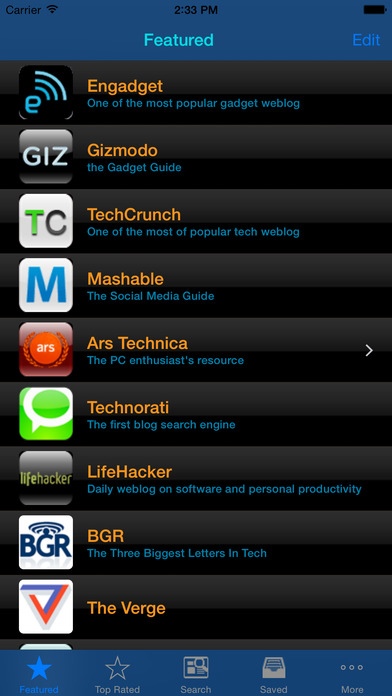
- inoTechNews is full featured tech/gadget/mobile news reader that allows you browse, search multi-sites, read, save and share.
- *Cool* features that no other apps have such as hyper-fast downloading, fast multi-site searching, read-later, color coding, color theme, thumb image, previewing...
- inoTechNews has one of the most comprehensive list of popular tech news sites:
Engadget
Gizmodo
Techcruch
Mashable
Ars Technica
CrunchGear
MobileCrunch
Technorati
MacRumors
Macworld
AppleInsider
TUAW
iLounge
9 to 5 Mac
iPhoneFreak
Akihabara News
Digital Photography Review
Techmeme
Lifehacker
BusinessInsider
Slashdot
Technology Review
PhysOrg
GigaOM
Coolest Gadgets
ComputerWorld
NASA
The Inquirer
Boy Genius Report
ReadWriteWeb
Lifehack
LostInTechnology
VentureBeat
Stuff Magazine
...
*** Features ***
- Browse: This app lets you browse the most popular tech/gadget/mobile news on the web...
- Fast multi-site search: search bar is provided everywhere from Featured to Saved tab. It allows you to get news you want quickly. No matter what you are looking for, type in the search bar, the app will pull all the related news from the multiple news sources.
- Hyper-fast download: this app not only can download 200 in 1 second (via WiFi) but also displays immediately before finishing downloading. We even display number of items in title bar.
- Top Rated tab: provides most recent news from top rated popular sites. Preview content is retained for later reading.
- Search tab: provides a large number news from numerous sites for searching purpose. Preview content is also retained.
- Read-Later: All news preview downloaded in "Top Rated" & Search tab is retained for later reading. You can now read your favorite tech blog on your flight.
- Preview: allows you to preview instantly without visiting the source website.
- Full-view: shows full webpage from original site. Shortcut via blue ">" button.
- Rich action options: allows users to switch full-view/preview, to save and share via email/SMS or via social media.
- Social media sharing via Twitter, Instapaper, Read It Later, LinkedIn, Tumblr, Evernote...
- Saved tab: how often did you see a good news and couldn't find it again to show to friends? Or you simply want to save the news for later reading before getting on airplane. Save feature not only allows you to save a news items but also allows you to save multiple news items quickly. In addition, it shows saved items in different color for your reference.
- Color coding: visual clues are important; therefore, we use different colors for read news, unread news and saved news.
- Multiple color theme for your preference
Requires iOS 6.0 or later. Compatible with iPhone, iPad, and iPod touch.
About InoTechNews tech news
The company that develops InoTechNews tech news is InoApp LLC. The latest version released by its developer is 3.0.0.
To install InoTechNews tech news on your iOS device, just click the green Continue To App button above to start the installation process. The app is listed on our website since 2010-04-16 and was downloaded 0 times. We have already checked if the download link is safe, however for your own protection we recommend that you scan the downloaded app with your antivirus. Your antivirus may detect the InoTechNews tech news as malware if the download link is broken.
How to install InoTechNews tech news on your iOS device:
- Click on the Continue To App button on our website. This will redirect you to the App Store.
- Once the InoTechNews tech news is shown in the iTunes listing of your iOS device, you can start its download and installation. Tap on the GET button to the right of the app to start downloading it.
- If you are not logged-in the iOS appstore app, you'll be prompted for your your Apple ID and/or password.
- After InoTechNews tech news is downloaded, you'll see an INSTALL button to the right. Tap on it to start the actual installation of the iOS app.
- Once installation is finished you can tap on the OPEN button to start it. Its icon will also be added to your device home screen.
Program Details
System requirements
Download information
Pricing
Version History
version 3.0.0
posted on 2010-04-16
Disclaimer
Official App Store Link
We do not host InoTechNews tech news on our servers. We did not scan it for viruses, adware, spyware or other type of malware. This app is hosted by Apple and passed their terms and conditions to be listed there. We recommend caution when installing it.
The App Store link for InoTechNews tech news is provided to you by apps112.com without any warranties, representations or guarantees of any kind, so access it at your own risk.
If you have questions regarding this particular app contact the publisher directly. For questions about the functionalities of apps112.com contact us.
